In the commercial display industry, TFT-LCD liquid crystal display modules are core components, and polarizers (POLs), as an indispensable part, directly affect the stability and durability of display performance.
As a manufacturer specializing in commercial displays, we frequently encounter customer inquiries about anomalies in polarizers during long-term use or reliability testing, such as color changes.
If these issues are not addressed promptly, they can lead to a decline in the overall performance of the display.
This article will delve into common problems with polarizers in LCDs, particularly the causes of color fading and practical solutions, helping you better maintain and optimize your display devices.
What Is A Polarizer
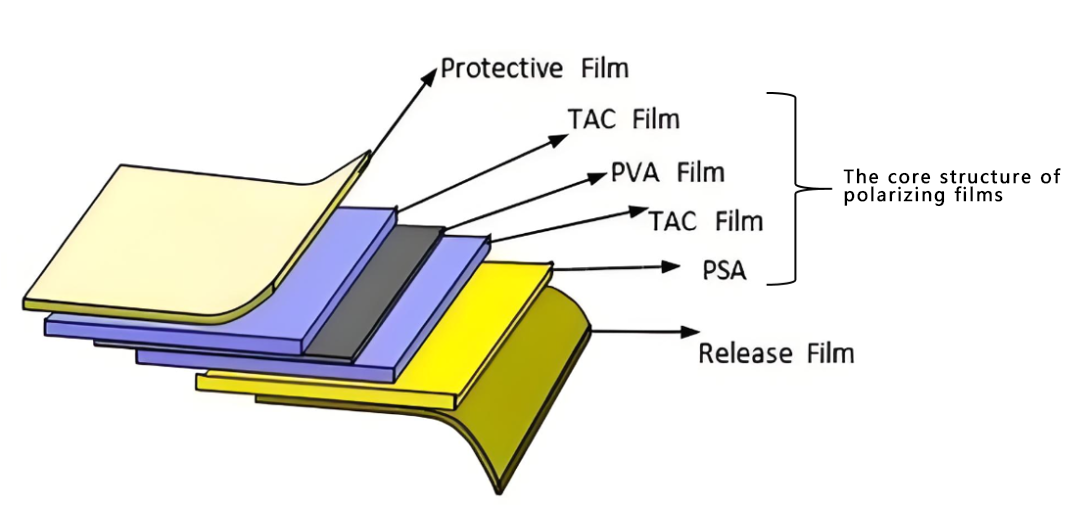
A polarizer is an optical thin film used in display devices to filter light from specific directions, enabling liquid crystal displays (LCDs) to show images. Its basic structure, from top to bottom, is as follows:
Surface Protective Film
Upper TAC Layer
PVA Layer
Lower TAC Layer
PSA Adhesive Layer
Release Film
The PVA layer forms an ordered structure by adsorbing iodine ions, achieving selective absorption of different colors of light, thus allowing the screen to display neutral gray or precise tones. If this structure is disturbed by external factors, color deviation will occur.
Why Do Polarizer Filters Discolor?
In reliability testing of LCD displays, polarizers often exhibit discoloration under conditions such as high temperature, high humidity, or UV exposure, meaning the color shifts from normal gray to yellow, blue, or white.
This change mostly occurs at the edges of the display area and can be quantified by measuring the b-value (yellow direction) or a-value (red/green direction) with a colorimeter. Discoloration not only affects aesthetics but can also reduce contrast and brightness.
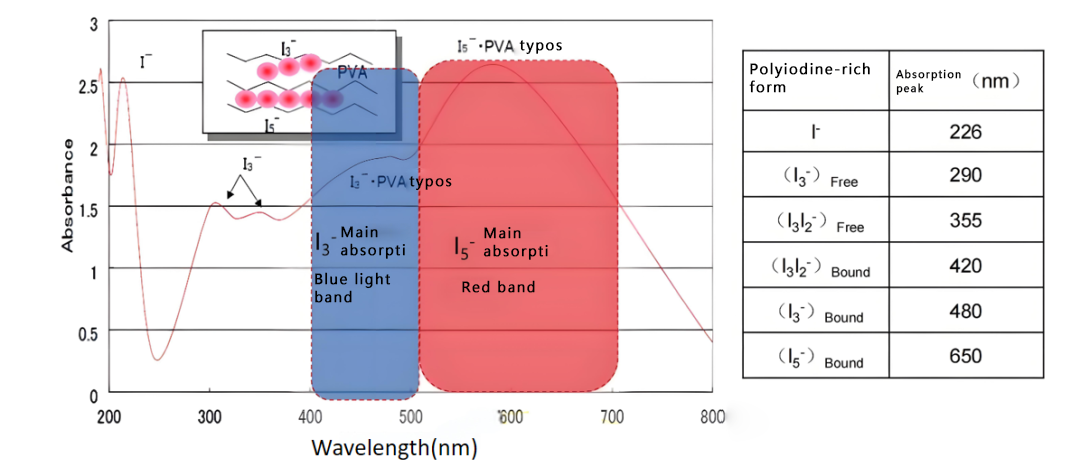
The root cause of discoloration lies in the stability of iodine ions in the PVA layer. I3- ions absorb blue light, while I5- ions absorb red light. When the ion balance is disrupted, the color shifts. We will analyze the causes according to common types and provide improvement suggestions for commercial displays.
LCD Polarizer Film Yellowing
First, before analyzing the causes of polarizer color loss, we need to understand the hue and deflection direction of polarizers.
According to the polarizer hue chart, the 'a' and 'b' values represent the direction of the color.
The 'a' value represents the direction of red, and the '-a' value represents the direction of green;
The 'b' value represents the direction of yellow, and the '-b' value represents the direction of blue.
Yellowing of polarizers is the most common color loss problem in LCD displays. It usually appears in the edge areas of the display. We can use the 'b' value to quantitatively test and determine the yellowing of products and areas. If the 'b' value increases significantly compared to the initial state, it can be determined as yellowing.
Improvement Measures For Yellowing Polarizers
To reduce yellowing, we recommend focusing on materials and processes:
○Strictly monitor reliability testing conditions to ensure temperature and UV energy do not exceed specifications.
○Store polarizers in sealed packaging and reseal immediately after unpacking.
○Prepare the entire batch of materials at a low temperature before assembly to control moisture content.
○Initiate extended baking temperatures at the production front end and establish moisture content standards for monitoring.
○Choose neutral or low-acid OCA to avoid chemical reactions.
○Control the duration and intensity of the UV curing process to prevent overexposure.
Polarizing Film Turns Blue
Compared to yellowing, bluish discoloration is less common and is mainly affected by high temperature and humidity. It manifests as an enhanced blue tint at the edges, stemming from increased movement of PVA molecules under humid and hot conditions, leading to the breakdown of cross-links.
I3- ions (which absorb blue light) are more easily decomposed, resulting in increased blue light transmittance and the blue discoloration.
This problem may be amplified in the humid environments of commercial displays, such as bathrooms or coastal areas.
Improvement Measures For Polarizers Turning Blue
The key to preventing blue discoloration is humidity control:
○Verify the humidity settings of the testing equipment to ensure they are within the standard range.
○Avoid condensation caused by sudden temperature changes during testing; place the product properly to prevent water droplet accumulation.
○Test samples should simulate actual shipping conditions, such as fully laminated modules with covers to prevent moisture intrusion.
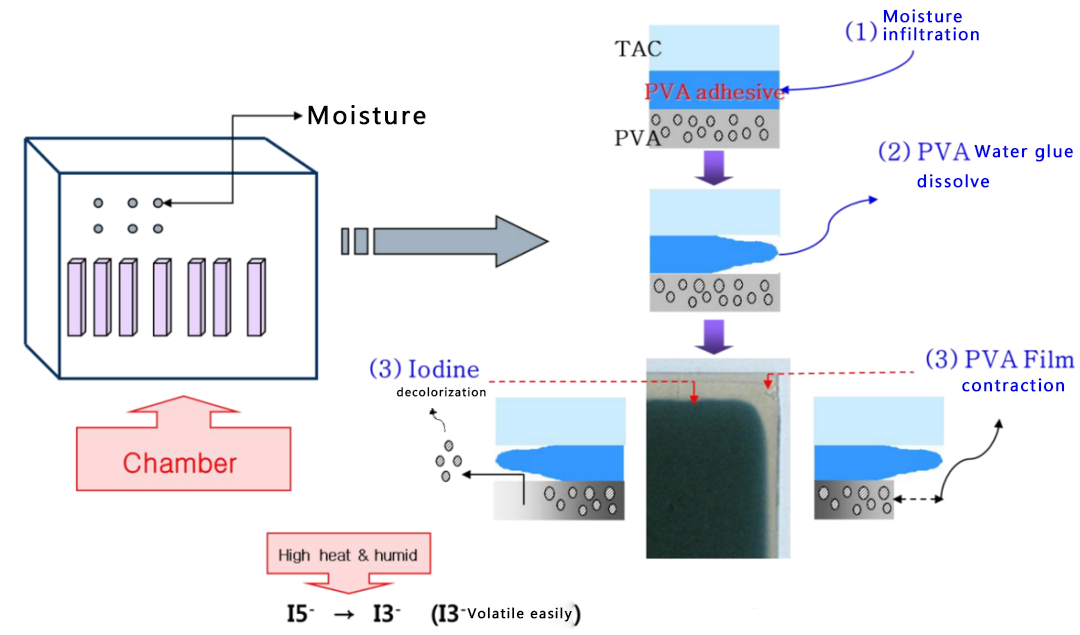
Polarizing Film Turns White
Whitening is the most severe form of discoloration, usually limited to the edges, similar to bluish but more pronounced.
PVA layers are highly water-soluble. Under high temperature and humidity, condensation forms at the edges, and water droplets soak the PVA, causing it to dissolve and lose its polarizing function.
This is common in reliability testing or high-humidity applications; if left untreated, it can lead to the failure of the entire display area.
Improvement Measures For Addressing The Whitening Of Polarizers
The causes of whitening in polarizers are similar to those of bluish discoloration, and the corresponding measures can be applied interchangeably, but enhanced protection is necessary:
○Similar to bluish discoloration, prioritize checking humidity and preventing condensation.
○Use protective covers or reinforce edge seals to reduce moisture penetration.
○During the design phase, select moisture-resistant polarizer materials to improve overall protection.
Conclusion
Abnormalities in polarizers are often a comprehensive reflection of the internal materials, manufacturing processes, or operating environment of the display screen.
Phenomena such as yellowing, bluing, and whitishness may involve multiple engineering aspects, including thermal management, sealing design, and material compatibility.
Through scientific testing methods, reasonable environmental control, and proactive design prevention, the reliability and lifespan of LCD displays can be significantly improved.